Friday, July 31, 2009

Make a widget is hidden

So that the space in the Sidebar of your blog does not seem dense, then needed Widget hidden in the sense that only appear in the title of the widget.

Here, I apply a widget to SHOUTMIX. However, this widget should not be applied to Shoutmix only.
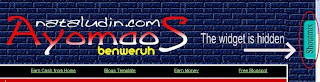


Step by step how to create it, is as follows:

1. Log in to your Blogger account, select "Layout" then "Page Elements",

2. Click the "Add a Gadget", then select "HTML / JavaScript"

3. Add the code below:

<style type="text/css">
#gb{
position:fixed;
top:50px;
z-index:+1000;
}
* html #gb{position:relative;}

.gbtab{
height:100px;
width:30px;
float:left;
cursor:pointer;
background:url('http://i288.photobucket.com/albums/ll179/ahnning/shoutmix.png') no-repeat;
}
.gbcontent{
float:left;
border:2px solid #A5BD51;
background:#F5F5F5;
padding:10px;
}
</style>

<script type="text/javascript">
function showHideGB(){
var gb = document.getElementById("gb");
var w = gb.offsetWidth;
gb.opened ? moveGB(0, 30-w) : moveGB(20-w, 0);
gb.opened = !gb.opened;
}
function moveGB(x0, xf){
var gb = document.getElementById("gb");
var dx = Math.abs(x0-xf) > 10 ? 5 : 1;
var dir = xf>x0 ? 1 : -1;
var x = x0 + dx * dir;
gb.style.right = x.toString() + "px";
if(x0!=xf){setTimeout("moveGB("+x+", "+xf+")", 10);}
}
</script>

<div id="gb">

<div class="gbtab" onclick="showHideGB()"> </div>

<div class="gbcontent">

<!-- Add the code SHOUTMIX or the other, here -->

<div style="text-align:right">
<a href="javascript:showHideGB()">
[CLOSE]
</a>
</div>

</div>

</div>

<script type="text/javascript">
var gb = document.getElementById("gb");
gb.style.right = (30-gb.offsetWidth).toString() + "px";
</script>

To set the distance from the top position, please change the value of top: 50 px suit your taste.

Please try, and safely enjoy your new widget.
»»  read more

Thursday, July 30, 2009

Flock 2.5.1


You already use Flock 2.5., a browser that is not less fast than firefox 3.5.1. When the condition of connectivity which is very slow, not like other browsers, flock 2.5.1 still running and not to crash.
Flock version 2.5, released on Tuesday by Redwood City, Calif.-based Flock, is designed to let social network addicts spend their entire day in a single browser window.

Flock delivers the latest webmail, photos, videos and updates from your favorites sites, so you can stop running around. Take a load off. Enjoy.

Keep In Touch - Keep in tune with your friends and their activities. Flock makes sure you never miss a beat.

It's Cool To Share - Flock hooks it all together so you can drag and drop anything to your friends.

Make the News: Publish Yourself - Flock makes blogging and photo uploading to popular services super easy. Just log in to your favorite service and your instantly ready to publish anything from anywhere on the web with Flock.

Easy Access - Flock automatically connects you with over 20 of your favorite online services. Just log in. Flock does the rest.

Stay Informed and Be Heard - Flock has features you can't find in any other browser, whether you're consuming the news or making the news.

The most impressive enhancement is drag-and-drop support for posting multimedia content to Facebook. The browser automatically handles posting of links, images, audio or video directly to the user’s Facebook account

If you’re not sold yet, download Flock and get ready to meet your new favorite browser.
»»  read more

Monday, July 27, 2009

Earn money from Paid To Click

Confused with Paid To Click that wanted to be followed by you? Don't worry, I had several of Paid To Click that could be followed by you.

At this time, indeed a great number of Paid To Click that sprang up. However, will they really pay his member like that was promised by them?

So, if you want to join the Paid To Click, I encourage you to carefully select the Paid To Click. To avoid a waste of time, energy and mind. For that, I suggest you follow Paid To Click below:


By joining Paid To Click, you can monetize blog, because you can add a refferal link in your blog
»»  read more

Tuesday, July 21, 2009

Let's clear Thinking

Even more of them commented and not be based on in the fact, made the bomb tragedy in the JW Marriott Hotel and Ritz Carlton like the fungus that grew so fast. This situation had the potential to disrupt the achievement of police in expressing the mastermind and the perpetrators of the bombing.

Therefore, it is expected to all parties not to provide statements that are not clearly related to the bomb detonation in the Mega Kuningan, Jakarta. Moreover, at this time still in the presidential election that has not been completed.

The case of the Bomb in the JW Marriott Hotel and Ritz Carlton must not be completed with confusing information. This is only the more severe the situation, the cause is not clear that the suspicion of a particular institution. Statements that are not clearly related to the bomb detonation at the Hotel JW Marriott and Ritz Carlton will only increase the sense of worry and the impact on Indonesia's image in international eyes.

The government must immediately make a recovery after the bombardment. The police should also conduct an investigation immediately to the bombardment and the JW Marriott Hotel Ritz Carlton arrested. With the arrest perpetrators as soon as possible or immediately reveal the mission of the bomb detonation, including the mastermind behind the blitz, there will not be any effect of Indonesia is not safe.

As known, the various speculations about the identity of the bombardment began to appear to the public. One of them was the relentlessness of one of the perpetrators had the initials NH as the alumnus "Ponpes Al Mukmin, Ngruki."

Also had previously appeared polemic comment on President Susilo Bambang Yudhoyono issued a few hours after the bomb explosion. The President seems to connect the bomb explosion with the disappointment of some, the results of the presidential election.

Apart from all that, let us attempt to understand tragedy bomb in the Hotel JW Marriott and Ritz Carlton, wisely and with purpose to help police, in this case reveals.
»»  read more

Thursday, July 16, 2009

Ashampoo® Photo Commander 7


Ashampoo® Photo Commander 7 is an all-in-one application for organizing, editing, sharing and presenting photo collections with additional audio and video playing and management capabilities.

Highlights:
  • 3D hardware acceleration for a big speed boost
  • Much faster and more flexible media database
  • Virtual albums (Favorites) for better organization
  • Stitch images to create panoramas
  • Quick slide shows with cool effects and music
  • New digital camera and scanner importer
  • New advanced media search features
  • Find duplicate images with different names
  • Print multiple photos on a single page
Operating systems: Windows® XP & Windows Vista™ (32-Bit)
»»  read more

Thursday, July 9, 2009

Ngeloe Simple Blogger Template


After a few days to edit the template for the Blogger community, the design template blogger by the name "Ngeloe Simple Blog" I have already completed.

"Ngeloe Simple Blog" is a template for Blogger, consists of two columns. Style blogger template is designed with the Adobe Photoshop CS3.

Properties :
  • 2 Columns
  • Fixed width
  • Two columns on the header
  • Right sidebar
  • Automatic Read More Hack For Blogger With Thumbnails

How to upload Blogger templates
  • Download your Blogger XML template from my blog or bCOMStudio. The template is contained in a zip file (winzip, winrar), ensure you have extracted the XML template.
  • Log in to your Blogger dashboard and go to Layout > Edit HTML
  • Ensure you back up your old template in case you decide to use it again. To do this, click on the "download full template" link and save the file to your hard drive.
  • Look for the section near the top where you can browse for your XML template:
  • Enter the location of your template and press "upload".
  • The HTML of your new template will now appear in the box below. You can preview your template or simply save to start using it!
  • Enjoy!

Important Note:

  1. Give a donation to me, to support in order to increase the spirit of creating a template blogger.
  2. Template provided free of charge, please do not change the credit link on this template.


DEMO | DOWNLOAD |
»»  read more

Tuesday, June 30, 2009

Duo Minima Template

Duo Minima Template , is the result of the modification minima, which is devoted to a community blogger who like to display a simple blog. In accordance with the name, Duo Minima template consists only of two columns.

The features of the Duo Minima Template, is as follows:

  • It consists of two columns
  • Hide / show blogger navbar
  • Display header in the top of the sidebar. When using pictures, then you must create an image with 310x200px size. In this case, the higher the image can be customized to the needs.
  • Cool Navigation Bar
  • Tabview with three columns.
  • Automatic Thumbnail
  • Automatic Post Summary
  • Modify blockquote

" Duo Minima Template ", ideal for those who join in the Paid To Review.

DEMO | Download | If you wish, please donate to support me, thank you.


»»  read more

Thursday, June 25, 2009

Thirteen Mag Blogger Template

I have created a template "Thirteen Mag Blogger Template", expected to be used by the blogger community.

"Thirteen Mag Blogger Template" consists of:
  • 13 column
  • Divided by two column headers, so the user "Thirteen Mag Blogger Template" can add the ad with the size 486 X 100px.
  • "Thirteen Mag Blogger Template" has a navigation menu that is easily operated.
  • In "Thirteen Mag Blogger Template" Tabview also installed, which consists of 3 columns.
  • "Thirteen Mag Blogger Template" with readmore automatic.
  • "Thirteen Mag Blogger Template" apply scroll system, in the column under the navigation menu, and in the Comment Box


How to install "Thirteen Mag Blogger Template".
  • Blog template that you replace with "Thirteen Mag Blogger Template", must be in the backup first.
  • Make sure to manually copy the widget is in your blog using the notepad.
  • Browse "Thirteen Mag Blogger Template" and then upload "Thirteen Mag Blogger Template".
  • After the confirmation and keep "Thirteen Mag Blogger Template".
  • Then it's up to you how to beautify your blog's appearance.

Restrictions and how to change certain sections.

User "Thirteen Mag Blogger Template" is prohibited to change the credit - footer:

<div id='credit-footer'><!-- do not delete this section/jangan menghapus bagian ini -->
&lt;p&gt;
Copyright @ 2009 By : &lt;a href=&quot;http://www.nataludin.com&quot; target=&quot;_blank&quot;&gt;&lt;font color=&quot;yellow&quot;&gt;Ayomaos&lt;/font&gt;&lt;/a&gt; | Distribution by : &lt;a href=&quot;http://bcomstudio.blogspot.com&quot; target=&quot;_blank&quot;&gt;&lt;font color=&quot;yellow&quot;&gt;bCOMstudio&lt;/font&gt;&lt;/a&gt; | Powered By: &lt;a href=&quot;http://blogger.com&quot; target=&quot;_&quot; blank&gt;&lt;font color=&quot;yellow&quot;&gt;Blogger&lt;/font&gt;&lt;/a&gt; |
&lt;/p&gt;

&lt;p class=&quot;credit&quot;&gt;
&lt;a href=&quot;http://mozilla.com/firefox&quot; target=&quot;_&quot; title=&quot;Firefox&quot; blank&gt;&lt;img width=&quot;12&quot; src=&quot;https://blogger.googleusercontent.com/img/b/R29vZ2xl/AVvXsEhGcD9ixVxv5R5myMdLjqw3Dy2sq9vwrYH_OyRgIMKZ4eA_7OUiRE4c7kZtPlDGebSoiNZXCvj0Vm7KhbOA-FT0PE6Zb-P42HbwNNUeESO0iMmWIStRITG6DUds5s8XZqJK8wUfB_u287C3/s1600-r/firefox-icon.gif&quot; height=&quot;12&quot;/&gt;&lt;/a&gt;

&lt;a href=&quot;
http://www.microsoft.com/windows/internet-explorer/default.aspx&quot; target=&quot;_&quot; title=&quot;Internet Explorer 8&quot; blank&gt;&lt;img width=&quot;13&quot; src=&quot;https://blogger.googleusercontent.com/img/b/R29vZ2xl/AVvXsEjypXsZGBvlzZySjNX2GbMw5Zl-tdjqyVppEOmzTEg-GeKRtZaNuhrXW2isKdU-hXY81Tk8fNrLxwI3Ss4e33MVmJPLvaNe_ivf6gMrmpL5zMXqBsQjrgZjPsRK9fsCuCEth7EisA3Nmi6z/s1600-r/eweb-ie7.gif&quot; height=&quot;14&quot;/&gt;&lt;/a&gt;
&lt;/p&gt;
</div>


Blog Title is in the Header-Left.

You need to create an image with size 400 X 100 px, and then uploaded on www.photobucket.com. After getting the code image, please encodes the code image.
Below is an example to add the code.

<div class='headerleft'>

&lt;a href=&quot;http://s288.photobucket.com/albums/ll179/ahnning/?action=view&amp;current=headertemplatebarucopy.jpg&quot; target=&quot;_blank&quot;&gt;&lt;img src=&quot;http://i288.photobucket.com/albums/ll179/ahnning/headertemplatebarucopy.jpg&quot; border=&quot;0&quot; alt=&quot;magazine blogger template&quot;&gt;&lt;/a&gt;

</div>


To add the AD code in the "Header-right", please encode your ad code, and then add in the header-right.

Example:

<div class='headerright'>

... place the ad code after encode ...

</ div>


Change the navigation. Note the code Navigation menu, which is listed below:

<!-- This is the start of the menu -->
<div id='mainMenu'>
<a>Products</a>
<a>Support</a>
<a>About us</a>
<a>Download</a>
</div>
<div id='submenu'>
<!-- The first sub menu -->
<div id='submenu_1'>
<a href='http://ahn-bidikcom.blogspot.com'>Product 1</a>
<a href='http://ahn-bidikcom.blogspot.com'>Product 2</a>
<a href='http://ahn-bidikcom.blogspot.com'>Product 3</a>
</div>
<!-- Second sub menu -->
<div id='submenu_2'>
<a href='http://ahn-bidikcom.blogspot.com'>Phone</a>
<a href='http://ahn-bidikcom.blogspot.com'>Email</a>
<a href='http://ahn-bidikcom.blogspot.com'>Knowledge base</a>
</div>
<!-- Third sub menu -->
<div id='submenu_3'>
<a href='http://ahn-bidikcom.blogspot.com'>History</a>
<a href='http://ahn-bidikcom.blogspot.com'>The team</a>
<a href='http://ahn-bidikcom.blogspot.com'>Contact us</a>
<a href='http://ahn-bidikcom.blogspot.com'>Visions</a>
</div>
<!-- Fourth sub menu -->
<div id='submenu_4'>
<a href='http://ahn-bidikcom.blogspot.com'>Patches</a>
<a href='http://ahn-bidikcom.blogspot.com'>Whitepapers</a>
<a href='http://ahn-bidikcom.blogspot.com'>Tab menu</a>
<a href='http://www.nataludin.com'>Color picker</a>
<a href='http://www.nataludin.com'>Window scripts</a>
<a href='http://www.nataludin.com'>Games</a>

</div>
</div>
<br id='clearmenu'/>

Please change the code yellow, with the URL and your own creations

To change the tabview, the same steps as when you add gadgets on the sidebar.

Hopefully helpful, especially for a community blogger who need a template such as "Thirteen Mag Blogger Template" this.

DEMO-1 | DEMO-2 | Download
»»  read more

Wednesday, June 24, 2009

Optimizing the Site Online Store

If you have any plans to create online stores, or already have but do not produce according to your expectations, then you need to edit your website.
Some of the steps below may help you edit the web site of online stores that you have created.
  • Focus your web site, in certain products only. Example: If you sell a product of drugs, then focus your website on the products. Do not involve other products in the online store website, which you manage.
  • Optimize SEO. Optimize your web site set up as the title tags, meta description, meta keywords and HTML code needed. This is a little more involved to increase the value of your web site position on search engines.
  • Reproduce keyword. On each page, content with the keywords and write the main keyword between 7 to 10 times. Put the keyword as the anchor text.
  • Avoid using frames and javascript. The use of javascript and frames to prevent spider search engine to track perfectly in all your website content.
  • Content prime. Content bait can add charm your products. For example: you sell a product strong medicine, you may write "this is a strong herb medicine which resulted from the popular medicinal plant, which is able to increase stamina and sex excite you." Here the role of copywriting can arouse the emotional logic and prospective buyers.
  • Titles and subtitles. Besides the title, add subtitles on each page. The goal is to increase the reader's attention.
  • Information as accurately as possible. describe specifications, size, type, material, or anything related to your products. Explain with accurately as possible, when you need to use Video Streaming on the page your website.
  • Test website in different browsers. Try to test your website in various browsers such as FireFox, Opera, Internet Explorer, Chrome, and other. Make sure that you expect the view visible in every browser. In addition to the browser, the test also using a different computer screen sizes.
  • "Call to action". This step is appropriate to remind visitors to your web site, people often forget to remember the saturated after reading a long article. Add at the end of the sentence so that they immediately make a purchase.
  • Slowly but surely, from a small target and then increased to a larger product.
  • Do not give up easily in the running business Online Store you have path. Persistence, diligent and patient is absolutely necessary in order to achieve the expected success.

Hopefully can be successful and help to the online store that you manage.

»»  read more
Adsense Indonesia ads ads ads

Recent Comment

Follower

My friends

[A] • Abryan • Agnoe • Anied • Antiqueall [B] • bidikCOM • Budiawan H [C] • Catalog Tutorial [D] • Destiny • Djemari Ijal • Dorothy L [E] [F] [G] • Gemmasnewworld [H] • HEALTHINFO@EarthyMe [I] • iEn Muncet • Ihsan's Blog • Ikma Malaysia [J] [K] [L] [M] [N] • Nuranuraniku [O] • O-Range [P] [Q] [R] • Robbie's Blog [S] [T] • tiriBC • True Pillager [U] [V] [W] [X] [Y] [Z]